ros2 service list Colorization
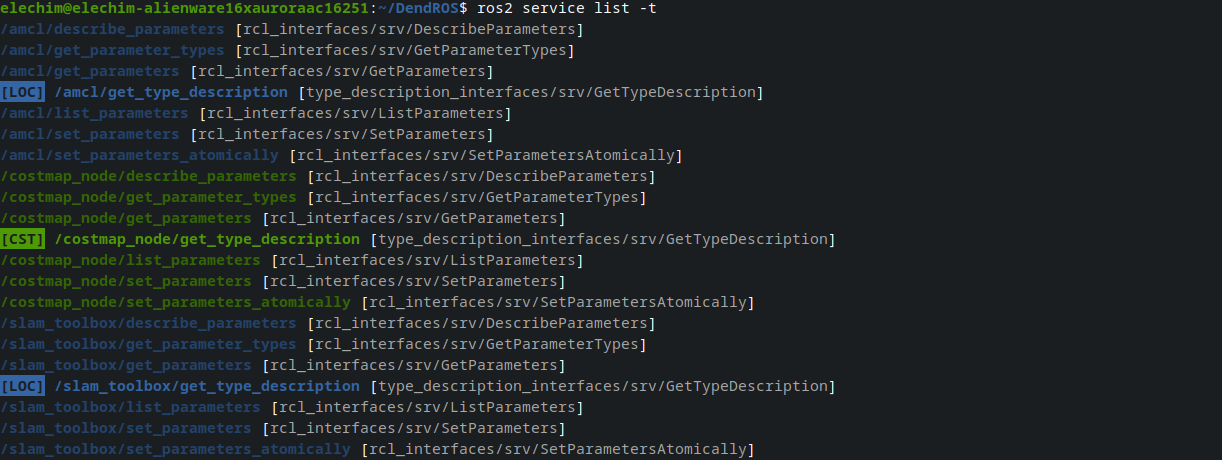
When you run ros2 service list, DendROS automatically colorizes the output using the same group colors and badges configured for ros2 launch. Standard ROS 2 system services are dimmed so your own services stand out.
What it looks like
What gets colored
Custom services
Services that belong to a node in your config are colored with that node's group color. The owning node is inferred from the service path — for /talker/my_service, DendROS looks up /talker in the color map using the same four-tier matching as ros2 node list (exact path, basename, wildcard path, wildcard basename).
A group badge is shown to the left of the service path when show_tag_cli is enabled and the group has a label.
Default (system) services
Every ROS 2 node automatically creates a set of standard parameter and logger services. These are rendered dimmed so they stay visible but don't compete with your own services:
describe_parametersget_parameter_typesget_parameterslist_parametersset_parametersset_parameters_atomicallyget_loggersset_logger_levelsget_type_description
When the owning node has a color configured, the name is dimmed in that color (node_color + dim). Otherwise it falls back to plain dim.
Hiding default services
If you want to declutter the output entirely, set show_default_services: false in ~/.config/dendROS/defaults.yaml (or toggle it in dendros config). Default services will be omitted from the output completely.
Type annotations (-t)
Running ros2 service list -t appends a type annotation to each entry:
The type content inside the brackets is always dimmed, keeping the focus on the service name.
Badge and style options
| Setting | Effect on service list |
|---|---|
show_tag_cli: true |
[LOC] /talker/my_service (badge always to the left) |
tag_style: inverted |
Badge rendered with colored background |
Per-group show_tag: false |
Badge suppressed for that group only |
unmatched_color |
Services with no matching node shown in the fallback color |
unmatched_tag |
Badge shown next to unmatched services (requires unmatched_color) |
dim_unmatched |
Services with no matching node dimmed (only when unmatched_color: null) |
show_default_services: false |
Default system services hidden entirely |