Quick Start
A complete walkthrough from zero to colorized output.
Step 1 — Install
Step 2 — Scaffold a config
Run dendros init from inside your bringup package:
Recursive mode
If your launch file includes other packages, use --recursive to follow them:
[dendROS] package: my_bringup
[dendROS] scanning (recursive) launch files…
[dendROS] main.launch.py: 2 node(s)
[dendROS] found references to: nav2_bringup, slam_toolbox
[dendROS] nav2_bringup/bringup_launch.py [install]: 8 node(s)
[dendROS] slam_toolbox/online_async_launch.py [source]: 1 node(s)
[dendROS] found 11 node(s) in 3 group(s)
[dendROS] created config/dendROS.yaml
Step 3 — Edit the config
Open the generated config/dendROS.yaml and set colors and labels:
groups:
  nav2_bringup:
    color: "bold green"
    label: "NAV"
    nodes:
      - bt_navigator
      - controller_server
      - planner_server

  slam_toolbox:
    color: "bold blue"
    label: "LOC"
    nodes:
      - slam_toolbox

defaults:
  color_mode: tag_only
  show_group_tag: true
  unmatched_color: null
See Configuration for the full format and Colors for all accepted values.
Step 4 — Build and launch
cd ~/ros2_ws
colcon build --packages-select my_bringup
source install/setup.bash
ros2 launch my_bringup main.launch.py
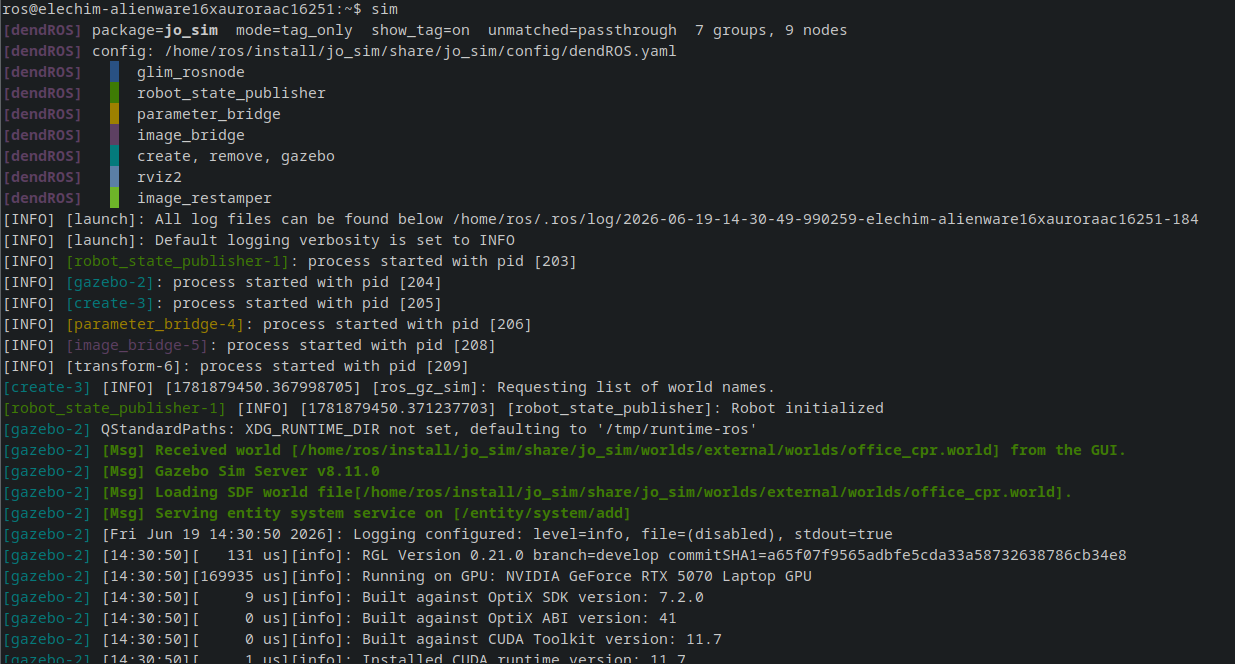
Done
Your terminal output is now colorized. No other changes to your launch files or ROS 2 setup are needed.
Troubleshooting
No colors showing
Run with debug mode:
If you seepassthrough mode, the config was not discovered. Verify:
- The package was built and you sourced
install/setup.bash. config/dendROS.yamlis installed. CheckCMakeLists.txtfor:
Nodes not matching expected colors
Check the debug summary — it prints each group and its patterns. Compare against raw output:
Node names are matched after stripping the-N suffix. Use wildcards (nav2_*) for nodes you don't know in advance.