Config File
Place dendROS.yaml inside your package's config/ directory:
DendROS discovers the file automatically via ros2 pkg prefix or AMENT_PREFIX_PATH. No path configuration required.
Let dendros init do the scaffolding
Running dendros init generates this file from your launch files and patches your build system to install it. See dendros init.
Full example
groups:

  localization:
    color: "bold blue"
    label: "LOC"
    nodes:
      - slam_toolbox
      - robot_localization
      - "*/amcl"           # matches amcl under any namespace

  navigation:
    color: "bold green"
    label: "NAV"
    nodes:
      - nav2_*             # covers all nav2_* nodes

  hardware:
    color: "#CC8800"
    label: "HW"
    show_tag: false        # suppress badge for this group only
    color_mode: full_line  # per-group: color entire line
    tag_style: inverted    # per-group: colored background, empty letters
    nodes:
      - robot_state_publisher
      - joint_state_publisher

defaults:
  color_mode: "tag_only"
  show_group_tag: true
  tag_position: "after"
  tag_style: "normal"      # normal | inverted
  unmatched_color: null
  unmatched_tag: null
  dim_unmatched: false
  colorize_launch_msgs: true
Groups
| Key | Required | Description |
|---|---|---|
color |
yes | Color for this group. See Colors. |
label |
no | Short badge text shown as [LOC]. Empty string = no badge. |
nodes |
yes | List of node name patterns. |
show_tag |
no | false suppresses the badge for this group only. |
color_mode |
no | Per-group override: tag_only or full_line. |
tag_style |
no | Per-group override: normal (colored text) or inverted (colored background). |
highlight |
no | List of keyword entries to highlight within this group's lines. See Keyword highlighting. |
Node matching
The numeric suffix (-1, -2) is stripped before matching.
| Pattern | Matches |
|---|---|
slam_toolbox |
[slam_toolbox-1], [slam_toolbox-2], … |
/my_ns/talker |
only nodes at that exact namespace path |
nav2_* |
nav2_controller, nav2_planner, … |
*/amcl |
/robot/amcl, /my_ns/amcl, … |
*controller* |
any node whose basename contains controller |
node_? |
node_a, node_b, … |
Lookup order (first match wins): exact full-path → exact basename → wildcard full-path → wildcard basename.
Defaults section
| Key | Default | Description |
|---|---|---|
color_mode |
tag_only |
tag_only or full_line. |
show_group_tag |
true |
Show [TAG] badges for this package. |
tag_position |
after |
after → [node-N] [TAG] … · before → [TAG] [node-N] …. |
tag_style |
normal |
normal (colored text) or inverted (colored background, empty letters). |
highlight |
[] |
List of keyword entries applied to all matched nodes in this package. See Keyword highlighting. |
unmatched_color |
null |
Color for unmatched nodes. null = pass through. |
unmatched_tag |
null |
Badge for unmatched nodes (e.g. "?" → [?]). Requires unmatched_color. |
dim_unmatched |
false |
Dim unmatched nodes. Only when unmatched_color: null. |
colorize_launch_msgs |
true |
Colorize [INFO] [node-N]: process started … lifecycle lines. |
color_mode
Colors only the [node-N] prefix and [TAG] badge.
ROS 2 severity colors are preserved — [WARN] stays yellow, [ERROR] stays red.
[controller_server-1] [NAV] [WARN] [1234.2]: Costmap is empty
Colors the entire line in the group's color. Severity colors are overridden.
[controller_server-1] [NAV] [WARN] [1234.2]: Costmap is empty
Priority order (most specific wins): per-group color_mode: → per-package defaults.color_mode: → global dendros config.
Keyword highlighting
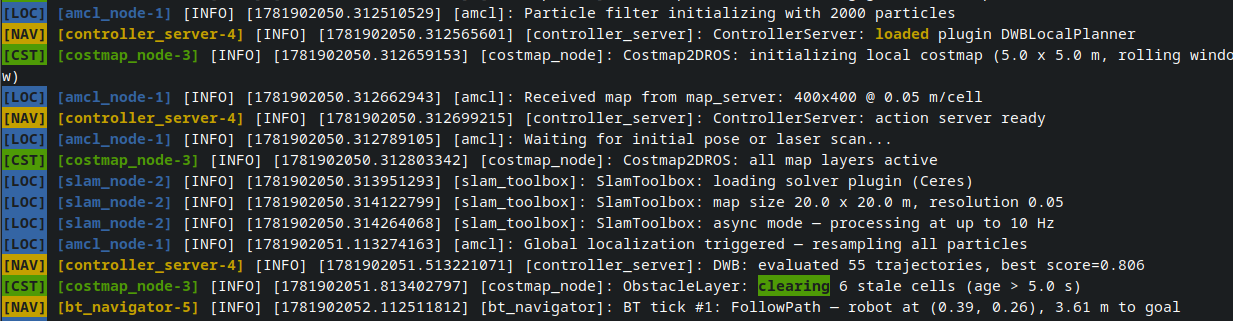
The highlight: (or also highlights:) key can appear under a group (applies only to that group's nodes) or under defaults: (applies to all matched nodes in the package). Keyword highlighting is the final colorization step — it runs after node-prefix coloring, badge insertion, and full-line coloring, so it never disrupts existing ANSI codes.
Keyword entry fields
| Field | Type | Default | Description |
|---|---|---|---|
word |
string | required | Text to match. Treated as a literal string unless regex: true. |
color |
string | null | Highlight color. Accepts the same formats as color: on a group. null = use the node/group color. |
bold |
bool | false | Apply bold to the highlight (appends ;1 to the resolved code). |
inverted |
bool | false | Apply reverse-video to the highlight (colored background, empty letters). |
case_sensitive |
bool | false | Match case-sensitively. |
regex |
bool | false | Treat word as a regex pattern. |
Keyword priority: group-level keywords take precedence over defaults-level keywords. When multiple keywords match the same text, the first entry in the list wins.
Example
groups:
  localization:
    color: "bold blue"
    label: "LOC"
    highlight:
      - word: "map loaded"      # use group color (bold blue), case-insensitive
        bold: true
      - word: "CRITICAL"
        color: "bold red"
        inverted: true          # colored background, empty letters
      - word: "pos: \\d+\\.\\d+"
        regex: true             # regex pattern
        color: "#FF8800"
    nodes:
      - slam_toolbox

defaults:
  highlight:
    - word: "WARN"              # applies to all matched nodes in this package
      color: "bold yellow"
    - word: "timeout"
      color: "bold red"