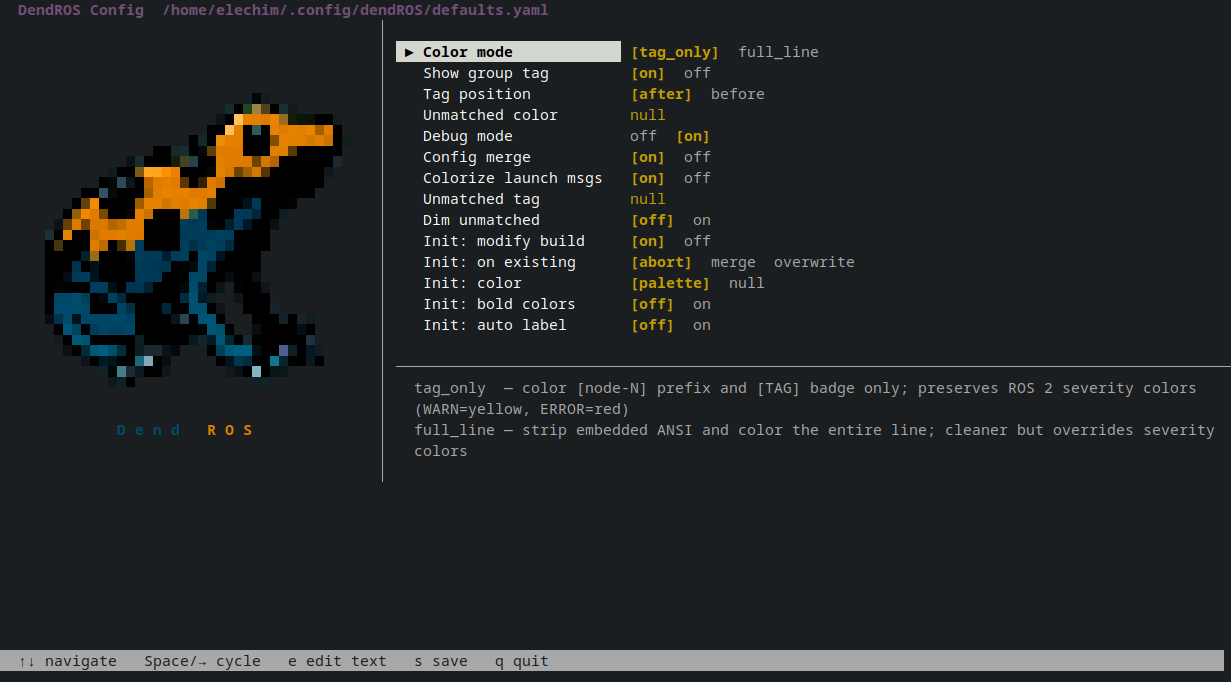
Global settings are the defaults for every package and every terminal. dendros config opens a full-screen editor for them.
dendrosconfig
Settings are written to ~/.config/dendROS/defaults.yaml and apply across all packages as a baseline. Per-package dendROS.yamldefaults: sections override them.
Settings are grouped into tabs — Output, CLI, Unmatched, System, Diagnostics, Param Alerts, Init — matching the section headers below.
Interface
dendros config
Keyboard reference
Key
Action
Tab / L
Next tab
Shift+Tab / H
Previous tab (Shift+Tab isn't sent by every terminal — use h if it doesn't respond)
Show [TAG] badges in ros2 launch and ros2 run output. Overridable per-group with show_tag: false.
Tag position
after / before
Badge position: before (default) → [TAG] [node-N] … · after → [node-N] [TAG] ….
Tag style
normal / inverted
normal = colored text on default background. inverted = colored background with empty letters (like crash alert banners). Overridable per-group with tag_style:.
Colorize launch msgs
on / off
When off, [INFO] [node-N]: process started … lines pass through unchanged.
Show timestamp
on / off
Show the [timestamp] bracket in node log lines ([node-N] [INFO] [timestamp] [logger]: msg). Off strips it.
Show logger name
on / off
Show the [logger_name] bracket — the ROS graph name registered via get_logger(), which can differ from the [node-N] launch process name. Off strips it.
Launch mode
classic / tui
tui (default) opens ros2 launch in the full-screen viewer with scrollback, search and filters. classic prints its output to the terminal as usual. ros2 run always uses classic. See TUI Mode.
TUI scrollback lines
integer
How many lines TUI mode keeps. Default 5000. Only used when launch mode is tui.
Ignore bold
on / off
Compatibility fix: some terminals brighten bold foreground text but never brighten backgrounds, so a group's bold color can look like two different shades between a node's regular text and its inverted [TAG] badge. Turn on if colors look inconsistent in your terminal. Applies everywhere colors are resolved — ros2 launch/run, the TUI, and all CLI commands. See Troubleshooting.
CLI commands
Setting
Values
Description
Show tag (CLI)
on / off
Show [TAG] badges in every colorized ros2 CLI command: node list, node info, topic list, service list, action list, param list and param describe.
Show default services
on / off
When off, standard ROS 2 system services (set_parameters, get_parameters, get_loggers, …) are hidden from ros2 service list output entirely. When on, they appear dimmed.
Topic list sort
default / group
default preserves ros2's alphabetical order. group places system topics first, then groups topics by their publisher's color group (groups in first-occurrence order, alphabetical within each group), with unmatched topics last. See ros2 topic list.
Unmatched nodes
Setting
Values
Description
Unmatched color
color / null
Color for nodes not in any group. null = pass through.
Unmatched tag
string / null
Badge for unmatched nodes (e.g. ? → [?]). Requires unmatched_color.
Dim unmatched
on / off
Dim unmatched nodes. Only when unmatched_color is null.
System
Setting
Values
Description
Debug mode
on / off
Print config summary to stderr on startup. Equivalent to DENDROS_DEBUG=1.
Config merge
on / off
Parse launch files for referenced packages and merge their configs.
Diagnostics
Crash alert and traceback highlighting — how node failures surface in the terminal.
Setting
Values
Description
Crash alert
on / off
Print an inline banner when a node dies unexpectedly. See Crash Alert.
Alert color
node / red
Crash alert color: node uses the group color; red always uses bold red.
Alert interval (s)
integer (seconds)
Seconds between periodic crash banner reprints. 0 = only on new crash events.
Traceback color
fancy / red / off
fancy = bold red header + dim red frames; red = all bold red; off = passthrough. See Traceback Highlighting.
Parameter change alert
Setting
Values
Description
Param change alert
on / off
Print an inline notification whenever a node's parameter changes at runtime. See Parameter Change Alert.
Param alert scope
tracked / all
tracked = only nodes with a config group; all = entire ROS graph.
Param alert style
inline / inverted
inline = compact colored line; inverted = full white-background strip, harder to miss in busy logs.